Agentic AI System Design From Tools to Autonomous Workflows
Agentic AI System Design From Tools to Autonomous Workflows
Tool use, planning, memory, reflection, multi-step execution, workflow orchestration.
Introduction
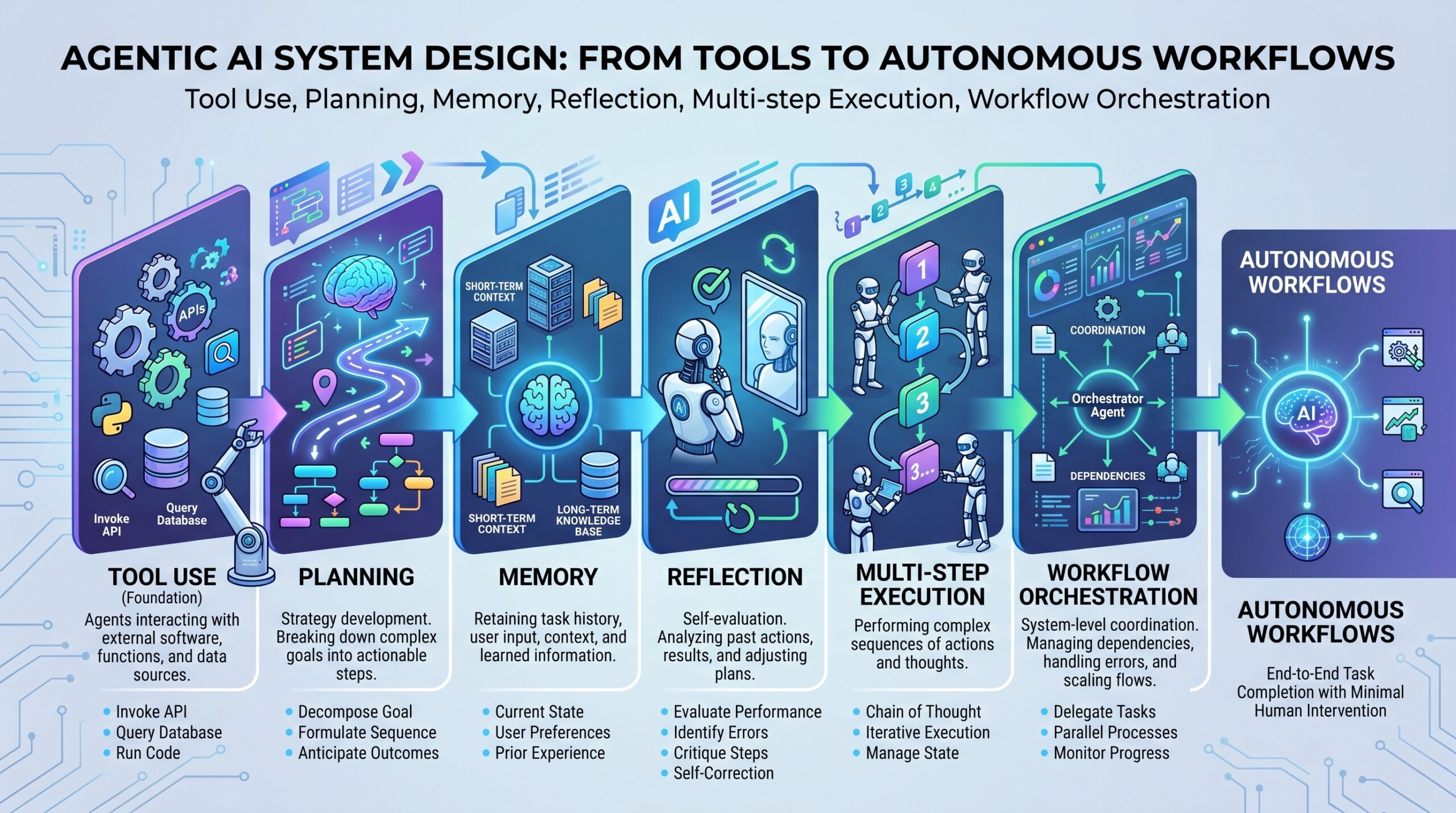
Agentic AI is the shift from “LLM as chatbot” to “LLM as an active system component.” A chatbot answers a question. An agentic system interprets a goal, plans steps, calls tools, checks results, remembers context, asks for human approval when needed, and continues execution across multiple stages.
This does not mean fully independent artificial employees. In practical system design, agentic AI is best understood as controlled autonomy. The system may use a language model for reasoning and decision-making, but the surrounding architecture must define tools, permissions, state, memory, evaluation, logging, security, and escalation rules.
Modern frameworks such as LangGraph, OpenAI Agents SDK, Microsoft Agent Framework, AutoGen, CrewAI, Semantic Kernel, LlamaIndex, and MCP-based tool ecosystems are making this easier. LangGraph emphasizes explicit, stateful workflows. OpenAI Agents SDK provides agents, tools, handoffs, guardrails, and tracing. Microsoft Agent Framework combines ideas from AutoGen and Semantic Kernel with enterprise features such as state management, telemetry, type safety, and graph-based workflows. CrewAI recommends Flows for production structure, with agents doing work inside controlled workflow steps.
The real design question is no longer “Can the model answer?” It is “Can the whole system reliably complete a task, recover from failure, stay within policy, and produce a useful result?”
Let’s dive deep into the topic now.
1. Start with workflow design, not agent hype
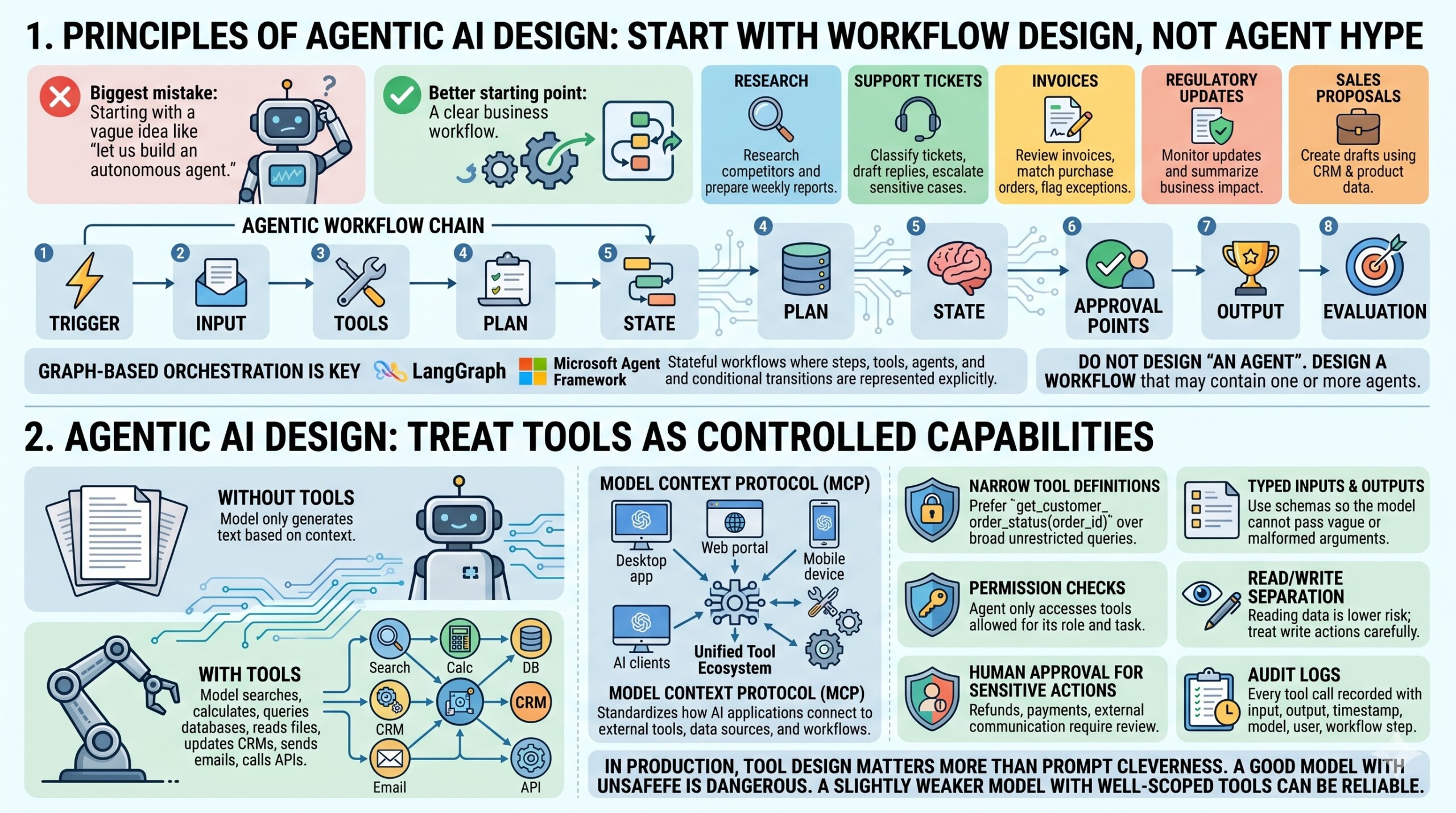
The biggest mistake in agentic AI design is starting with a vague idea such as “let us build an autonomous agent.” A better starting point is a clear business workflow.
For example:
- “Research competitors and prepare a weekly report.”
- “Classify support tickets, draft replies, and escalate sensitive cases.”
- “Review invoices, match them with purchase orders, and flag exceptions.”
- “Monitor regulatory updates and summarize business impact.”
- “Create first drafts of sales proposals using CRM and product data.”
Each of these has a goal, inputs, intermediate decisions, external tools, failure modes, and a final output. That is what makes it suitable for agentic design.
A practical agentic workflow should define:
- Trigger: What starts the workflow?
- Input: What information does the system receive?
- Tools: What systems can it access?
- Plan: What steps must be completed?
- State: What must be remembered during execution?
- Approval points: Where must a human review?
- Output: What is considered a successful result?
- Evaluation: How do we know the result is correct?
This is why graph-based orchestration has become important. LangGraph, for example, is designed around stateful workflows where steps, tools, agents, and conditional transitions can be represented explicitly. Microsoft Agent Framework also supports graph-based workflows for multi-agent orchestration.
The lesson is simple: do not design “an agent.” Design a workflow that may contain one or more agents.
2. Treat tools as controlled capabilities
Tool use is the foundation of useful agents. Without tools, the model can only generate text based on context. With tools, it can search, calculate, query databases, read files, create tickets, send emails, update CRMs, run code, or call APIs.
But every tool is also a risk. A badly designed tool can leak data, overwrite records, send wrong emails, or create security problems.
A well-designed tool layer should include:
- Narrow tool definitions: Prefer get_customer_order_status(order_id) over a broad unrestricted database query.
- Typed inputs and outputs: Use schemas so the model cannot pass vague or malformed arguments.
- Permission checks: The agent should only access tools allowed for its role and task.
- Read/write separation: Reading data is lower risk than modifying data. Treat write actions carefully.
- Human approval for sensitive actions: Refunds, payments, legal replies, HR decisions, and external communication should usually require review.
- Audit logs: Every tool call should be recorded with input, output, timestamp, model, user, and workflow step.
The Model Context Protocol, or MCP, is important here because it standardizes how AI applications connect to external tools, data sources, and workflows. It is increasingly useful when organizations want multiple AI clients to connect to the same tool ecosystem instead of building one-off integrations for each app.
In production, tool design matters more than prompt cleverness. A good model with unsafe tools is dangerous. A slightly weaker model with well-scoped tools can be reliable. An excellent collection of learning videos awaits you on our Youtube channel.
3. Planning should be structured, not magical
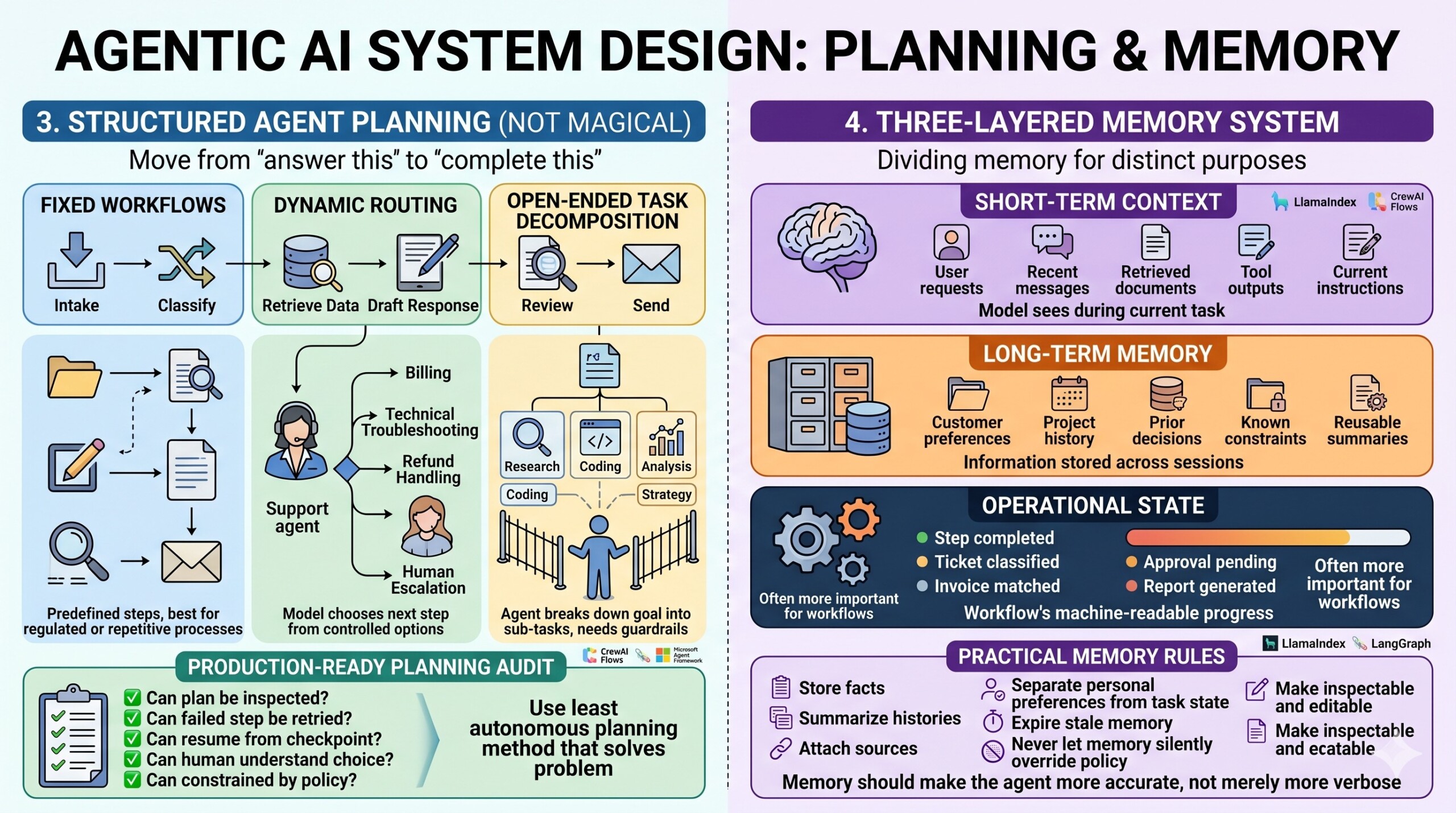
Planning is what allows an agent to move from “answer this” to “complete this.” But planning should not be treated as mysterious reasoning hidden inside the model. It should be represented in the system.
There are three practical planning patterns:
First, fixed workflows.
The system follows predefined steps. For example, intake, classify, retrieve data, draft response, review, send. This is best for regulated or repetitive processes.
Second, dynamic routing.
The model chooses the next step from a controlled set of options. For example, a support agent may route a case to billing, technical troubleshooting, refund handling, or human escalation.
Third, open-ended task decomposition.
The agent breaks a complex goal into sub-tasks. This is useful for research, coding, analysis, or strategy work, but it needs stronger guardrails.
For practical deployment, use the least autonomous planning method that solves the problem. Many enterprise use cases do not need a fully free-form agent. They need a workflow with a few intelligent decision points.
Frameworks reflect this direction. CrewAI Flows are recommended for production apps because they own state and execution order, while agents perform work inside controlled steps. LangGraph and Microsoft Agent Framework similarly support explicit orchestration rather than relying only on a free-running chat loop.
Good planning design asks:
- Can the plan be inspected?
- Can a failed step be retried?
- Can the system resume from a checkpoint?
- Can a human understand why the agent chose a path?
- Can the plan be constrained by policy?
If the answer is no, the system is not production-ready.
4. Memory must be divided into short-term, long-term, and operational state
Memory is one of the most misunderstood parts of agentic AI. Not every saved message is useful memory. In fact, too much memory can make agents confused, slow, costly, or unsafe.
Think of memory in three layers.
Short-term context is what the model sees during the current task. It includes the user request, recent messages, retrieved documents, tool outputs, and current instructions.
Long-term memory is information stored across sessions. This may include customer preferences, project history, prior decisions, known constraints, or reusable summaries.
Operational state is the workflow’s machine-readable progress. For example: step completed, ticket classified, invoice matched, approval pending, report generated.
For agentic systems, operational state is often more important than conversational memory. A workflow engine must know where the task is, what has been done, what failed, and what should happen next.
Practical memory rules:
- Store facts, not noise.
- Summarize long histories before reuse.
- Attach source references to important memory.
- Separate personal preferences from task state.
- Expire or review stale memory.
- Never let memory silently override policy.
- Make memory inspectable and editable.
For document-heavy agents, LlamaIndex and retrieval-augmented generation pipelines are useful because they focus on connecting models to structured and unstructured knowledge. For stateful workflow memory, frameworks such as LangGraph, CrewAI Flows, and Microsoft Agent Framework are more directly relevant.
The key principle is this: memory should make the agent more accurate, not merely more verbose. A constantly updated Whatsapp channel awaits your participation.
5. Reflection is useful, but verification is better
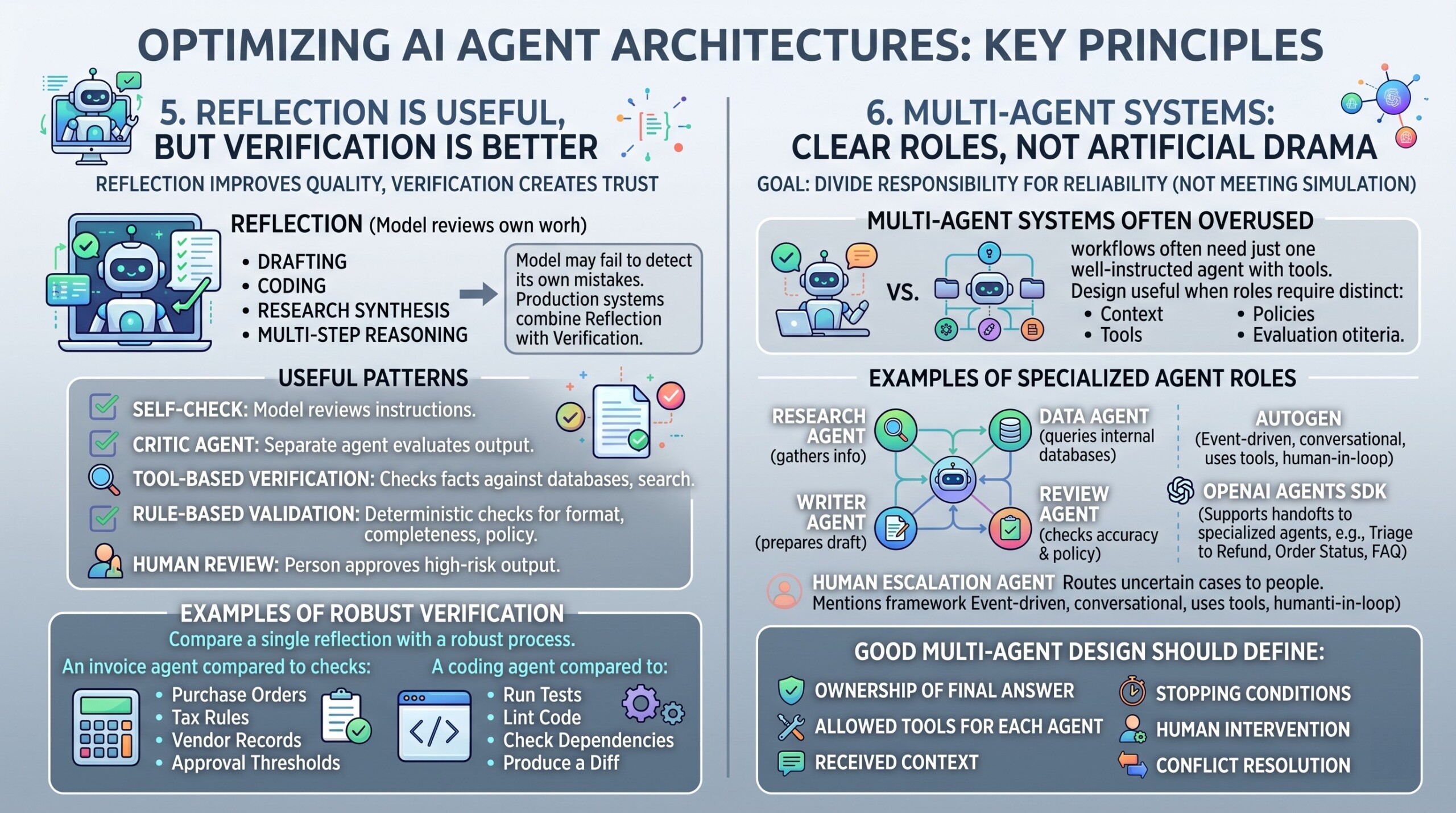
Reflection means the agent reviews its own work, identifies mistakes, and improves the result. It can be useful for drafting, coding, research synthesis, and multi-step reasoning.
But reflection has a weakness: the same model that made the mistake may fail to detect it. So production systems should combine reflection with verification.
Useful reflection and verification patterns include:
- Self-check: The model reviews whether it followed instructions.
- Critic agent: A separate agent evaluates the output.
- Tool-based verification: The system checks facts against databases, search results, tests, or calculations.
- Rule-based validation: Deterministic checks verify format, completeness, policy, and required fields.
- Human review: A person approves high-risk output before action.
For example, an invoice-processing agent should not merely “reflect” on whether the amount is correct. It should compare invoice data with purchase orders, tax rules, vendor records, and approval thresholds.
Similarly, a coding agent should not just say “the code looks good.” It should run tests, lint the code, check dependencies, and produce a diff.
Reflection improves quality, and verification creates trust.

6. Multi-agent systems should have clear roles, not artificial drama
Multi-agent systems are popular, but they are often overused. Many workflows do not need five agents pretending to be a manager, researcher, coder, reviewer, and strategist. Sometimes one well-instructed agent with tools is enough.
Multi-agent design becomes useful when roles genuinely require different context, tools, policies, or evaluation criteria.
Examples:
- A research agent gathers information.
- A data agent queries internal databases.
- A writer agent prepares the draft.
- A review agent checks accuracy and policy.
- A human escalation agent routes uncertain cases to a person.
AutoGen is well known for multi-agent conversation patterns and supports agents that can converse, use tools, and involve humans. Microsoft describes current AutoGen as an event-driven framework for scalable multi-agent AI systems.
OpenAI Agents SDK also supports handoffs, where one agent can delegate to another specialized agent. For example, a support triage agent may hand off to a refund agent, order-status agent, or FAQ agent.
Good multi-agent design should define:
- Which agent owns the final answer?
- Which tools can each agent use?
- What context does each agent receive?
- Can agents challenge each other?
- When does the system stop?
- When does a human intervene?
- How are conflicts resolved?
The goal is not to simulate a meeting. The goal is to divide responsibility in a way that improves reliability. Excellent individualised mentoring programmes available.
7. Workflow orchestration is the production backbone
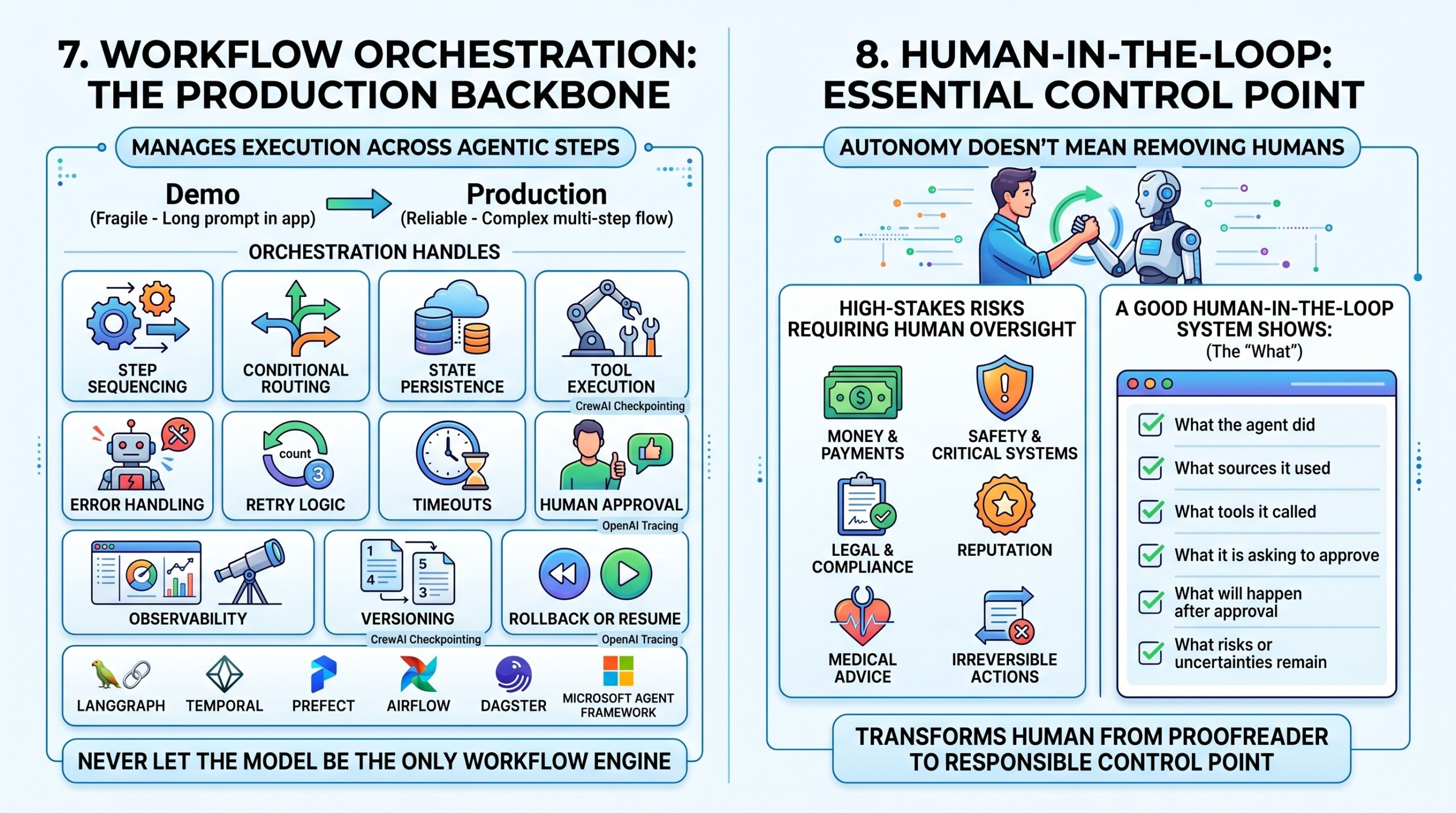
A real agentic system needs orchestration. This is the layer that manages execution across steps, decisions, retries, timeouts, failures, approvals, and logging.
Without orchestration, an agent becomes a long prompt inside an application. That may work for a demo, but it is fragile in production.
Workflow orchestration should handle:
- Step sequencing
- Conditional routing
- State persistence
- Tool execution
- Error handling
- Retry logic
- Timeouts
- Human approval
- Observability
- Versioning
- Rollback or resume
CrewAI now includes checkpointing so crews, flows, or agents can restore from the last checkpoint if execution fails, although its documentation notes checkpointing is in early release.
OpenAI Agents SDK includes tracing for LLM generations, tool calls, handoffs, guardrails, and custom events, making debugging and monitoring easier during development and production.
This is where many serious teams use frameworks such as LangGraph, Temporal, Prefect, Airflow, Dagster, Microsoft Agent Framework, or custom orchestration layers. The right choice depends on whether the workflow is mainly AI-native, data-pipeline-heavy, event-driven, or enterprise-integrated.
For practical teams, the key rule is: never let the model be the only workflow engine.
8. Human-in-the-loop is not a weakness
Many organizations think autonomy means removing humans. That is the wrong goal. The better goal is to use humans at the right points.
Human-in-the-loop design is essential when the task involves money, safety, reputation, law, hiring, firing, medical advice, regulated communication, or irreversible actions.
Human involvement can appear in several forms:
- Approval before sending an external email.
- Review before issuing a refund.
- Confirmation before updating a CRM record.
- Escalation when confidence is low.
- Manual correction of extracted data.
- Expert review of legal, medical, or compliance output.
CrewAI Enterprise documents human review features for Flows, including routing rules and email-first notifications. This reflects a broader industry pattern: production agents need structured collaboration with humans, not just autonomous execution.
A good human-in-the-loop system should show:
- What the agent did.
- What sources it used.
- What tools it called.
- What it is asking the human to approve.
- What will happen after approval.
- What risks or uncertainties remain.
This turns the human from a last-minute proofreader into a responsible control point. Subscribe to our free AI newsletter now.
9. Observability, evaluation, and governance must be built in early
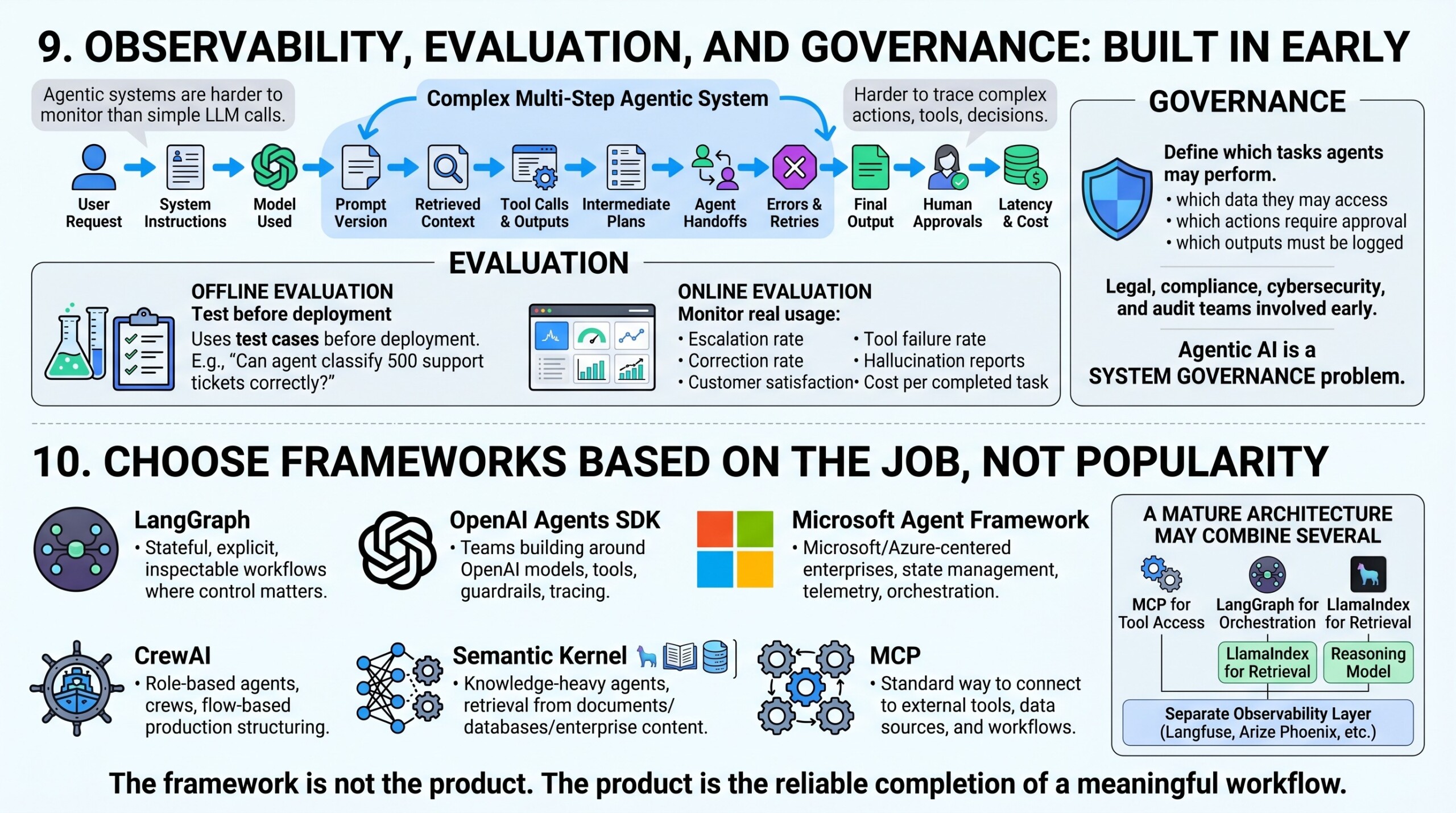
A gentic systems are harder to monitor than simple LLM calls because they involve multiple steps, tools, decisions, and intermediate outputs. A final answer may look fine even if the agent took a risky path to produce it.
Observability should capture:
- User request
- System instructions
- Model used
- Prompt version
- Retrieved context
- Tool calls
- Tool outputs
- Intermediate plans
- Agent handoffs
- Errors and retries
- Final output
- Human approvals
- Latency and cost
Evaluation should include both offline and online methods.
Offline evaluation uses test cases before deployment. For example, “Can the agent classify these 500 support tickets correctly?” Online evaluation monitors real usage: escalation rate, correction rate, customer satisfaction, tool failure rate, hallucination reports, and cost per completed task.
Governance is equally important. Define which tasks agents may perform, which data they may access, which actions require approval, and which outputs must be logged. For regulated sectors, include legal, compliance, cybersecurity, and audit teams early.
Agentic AI is not only a model problem. It is a system governance problem.
10. Choose frameworks based on the job, not popularity
There is no single best agent framework. The right choice depends on the task, team skills, deployment environment, compliance needs, and integration requirements.
A practical selection guide:
- LangGraph: Good for stateful, explicit, inspectable agent workflows where control matters.
- OpenAI Agents SDK: Strong fit for teams building around OpenAI models, tools, handoffs, guardrails, and tracing.
- Microsoft Agent Framework: Strong fit for Microsoft and Azure-centered enterprises that need state management, telemetry, type safety, and orchestration.
- AutoGen: Useful for research, prototyping, and multi-agent conversation patterns.
- CrewAI: Good for role-based agents, crews, and flow-based production structuring.
- Semantic Kernel: Useful for Microsoft ecosystem applications, plugin-style architecture, and enterprise AI integration.
- LlamaIndex: Strong when the agent is knowledge-heavy and needs retrieval from documents, databases, or enterprise content.
- MCP: Useful when you want a standard way to connect agents to external tools, data sources, and workflows.
A mature architecture may combine several of these. For example, a company might use MCP for tool access, LangGraph for orchestration, LlamaIndex for retrieval, OpenAI or Anthropic models for reasoning, and a separate observability layer such as Langfuse, Arize Phoenix, or custom telemetry.
The framework is not the product. The product is the reliable completion of a meaningful workflow. Upgrade your AI-readiness with our masterclass.
Conclusion
Agentic AI system design is moving from impressive demos to practical workflow automation. The winning systems will not be the ones with the most dramatic claims of autonomy. They will be the ones that combine LLM reasoning with disciplined engineering.
A strong agentic AI system has clear goals, well-scoped tools, structured planning, useful memory, verification loops, explicit orchestration, human approval points, and deep observability. It treats autonomy as a design variable, not a default setting.
The most practical way to build agentic AI is to begin with one valuable workflow, map its steps, define tool permissions, add memory only where useful, introduce reflection and verification, measure results, and expand gradually. Start with controlled autonomy. Earn trust through reliability. Then increase autonomy only where the system has proven it can act safely, accurately, and usefully.